
video connector
Please also note that the files with different compression format nor different resolution cannot be combined.
This app is developed by Sony Digital Network Applications, Inc.
(SDNA)
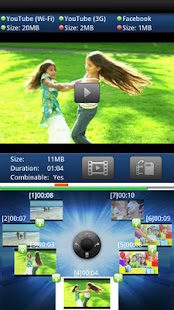
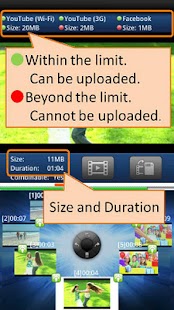
Features:- Key information at a glance Important information such as total file size, total duration, and connectivity of each video clips can be checked at a glance on the screen.- Simple operation Operations such as adding, deleting, and changing the order of videos can be done simply by moving the circular button at the center.- Quick processing The actual concatenation process is done speedily.Note: The videos with different picture resolution cannot be connected.
Use with video trimmer:Simple video editing can be done if you use video connector along with video trimmer.
Extract the good scenes out from the original videos using video trimmer first, and then use video connector to combine those scenes.
The two apps allow you to enjoy cut-editing of your videos.
video trimmer : http://www.sonydna.com/sdna/e/products/videotrimmer/index.html
Permissions:modify/delete USB storage contentsmodify/delete SD card contents - To save connected vieo files - To use as a temporary memoryPrevent phone from sleeping.
- To prevent the phone from going to sleep while outputting a file.
For more information, please refer to:http://www.sonydna.com/sdna/e/products/videoconnector/index.html
Tested models:http://www.sonydna.com/sdna/e/products/videoconnector/tested_models.html
Photo and Video Solution From SDNA:http://www.sonydna.com/sdna/products/pr_pv/index.html
About video connector
- Package name (App ID)
- com.sonydna.videoconnector
- Available on
- Google Play
- Price
- Free
- Version
- v1.5.04.11010
- Developer
- CyberLink.com
Looking for the video connector APK?
The safest way to get video connector (com.sonydna.videoconnector) on your Android device is to install it directly from Google Play — you'll always get the latest official version, automatic updates, and no risk of modified or infected APK files from third-party sites.
Social Features
Connect and share with friends and the community.
Camera Features
Advanced camera features with editing capabilities.
Weather Features
Get accurate weather forecasts and real-time updates.
See video connector in Action
Frequently Asked Questions
Is video connector free?
Yes, video connector is free to download and install on Android through Google Play.
How do I install video connector on Android?
Open Google Play on your Android phone or tablet, search for video connector by CyberLink.com or tap the Google Play button on this page, then tap Install. The app downloads and installs automatically.
What is com.sonydna.videoconnector?
com.sonydna.videoconnector is the App ID (package name) of video connector on Google Play. Every Android app has a unique package name, and it is the safest way to verify you are installing the official app.
Is video connector safe to download?
Installing video connector from Google Play is the safest option: you get the official version published by CyberLink.com, verified by Google Play Protect, with automatic updates. Avoid APK files from unofficial third-party sites.
Get video connector Today
video connector for Android — free download on Google Play.
Compatible with Android phones and tablets — available on Google Play.
Ask AI about this app
Get instant answers about features, tips and more from popular AI assistants.